1. Why a new file format?
Apache Parquet has been the default for analytical columnar storage for over a decade. So why did the LanceDB team spend years building Lance from scratch?
Because Parquet was designed for OLAP scan workloads on tabular data, and AI workloads access data differently.
Three forces driving a new format
A) Random access at scale
Parquet achieves great compression and scan throughput through row groups, blocks of rows that are compressed together. The same design makes point lookups expensive. To read a single row, you must decompress an entire page (often 1 MB+). When your workflow is vector search (finding the top k nearest neighbours out of millions of vectors), you're doing millions of these point lookups, and Parquet's structure is a poor match for that access pattern.
Lance is benchmarked at ~100× faster random access than Parquet. It gets there by making every encoding "sliceable": you can extract a single value without decoding its entire page.
B) Multimodal & wide data
Traditional databases store strings and floats. ML workloads store things like:
- High dimensional embeddings (e.g., 1536 float CLIP vectors ≈ 6 KiB per row)
- Raw image bytes (100 KB to 10 MB per row)
- 3D point clouds, audio waveforms, video frames
Parquet's row group sizing is a nightmare here. A row group sized for small floats will be comically large when each row contains a 4 MB image, and one sized for images will be tiny for float columns. No single size works for both.
C) Unified storage for original data + embeddings
Most vector database architectures force a split: your raw data (images, docs) lives somewhere like S3, and only the embeddings + metadata go into the vector DB. That costs you operational complexity, latency, and money. Lance stores original data and its vector representations together in the same format, so one dataset works as a multimodal lakehouse.
What Parquet does wrong (technically)
Parquet File
├── Row Group 0  (e.g., rows 0–65535)
│   ├── Column Chunk: "id"
│   │   ├── Page 0  [compressed, must decompress all to get row 42]
│   │   └── Page 1
│   ├── Column Chunk: "embedding"
│   │   └── Page 0  [128 KiB compressed; a single value is buried inside]
│   └── ...
├── Row Group 1
└── File Footer   [ALL column metadata expensive for wide schemas]
The main Parquet pain points:
- Row groups create a "one size fits none" problem for mixed workloads
- Encodings can't access column/file metadata, forcing redundant data (e.g., dictionaries repeated per row group instead of stored once)
- Page level access granularity means reading one value reads an entire page
- Wide schema metadata must be fully read even when projecting a single column
- Adding new encodings requires modifying every reader implementation across the ecosystem
2. Lance vs. Parquet side by side
| Feature | Apache Parquet | Lance (v2.1) |
|---|---|---|
| Primary Design Goal | OLAP analytics, ETL | ML/AI workloads, ANN search, multimodal |
| Access Pattern | Sequential scan | Both sequential scan and random access |
| Row Groups | Yes (fundamental unit, 64K-128K rows typical) | No (eliminated entirely in v2) |
| Random Access Speed | Slow (must decode entire page) | ~100× faster; direct offset calculation |
| Compression | Aggressive (Snappy, Zstd, Gzip) | Structural + compressive encodings (v2.1); avoids sacrificing random access |
| Embedding/Tensor Storage | Awkward (requires fixed size list tricks) | First class; wide columns handled natively |
| Versioning | None (external tooling, e.g., Delta Lake) | Built in, zero copy versioning (Git-like) |
| Vector Index | None | IVF-PQ, IVF-HNSW-PQ, IVF-HNSW-SQ, binary |
| Full Text Search | None | Yes (inverted index built in) |
| Deletions | Rewrite entire file | Soft delete via deletion file per fragment |
| Schema Evolution | Partial support | Full; tracked per version |
| Encoding Extensibility | Hard (requires patching readers) | Pluggable; encodings are self describing |
| Ecosystem | Pandas, Spark, Hive, Trino, Athena, ... | Arrow, DuckDB, Pandas, PyTorch, HuggingFace |
| Metadata on Wide Schemas | Full schema loaded always | Lazy; only requested columns' metadata loaded |
| Null Handling | Some edge cases lost (old v1 Lance too) | Explicit null tracking (v2) |
| Storage Format | Single file per partition | Fragments (data files + optional deletion file) + manifest |
| Best For | Data warehousing, BI dashboards, ETL | Vector search, RAG, ML training, feature stores |
3. Lance file layout & random access internals
3.1 Dataset anatomy
A Lance dataset on disk looks like this:
my_dataset.lance/
├── _latest.manifest          ← symlink/pointer to newest version
├── _versions/
│   ├── 1.manifest            ← Version 1 metadata
│   ├── 2.manifest            ← Version 2 metadata (after insert)
│   └── 3.manifest            ← Version 3 metadata (after delete)
├── data/
│   ├── fragment_0/
│   │   ├── data_0.lance      ← Column data file
│   │   └── deletions.bin     ← Roaring bitmap of deleted row IDs
│   ├── fragment_1/
│   │   └── data_0.lance
│   └── fragment_2/
│       └── data_0.lance
└── _indices/
    └── ivf_pq_index/         ← Pre built ANN index files
The manifest is the dataset's table of contents. It tracks which fragments exist, their row counts, schema, and which deletion files apply.
Fragments are immutable chunks of data. Each insert creates one or more new fragments. Fragments are never mutated in place; deletions go into a separate roaring bitmap file. Lance's MVCC (multi version concurrency control) design rests on this.
3.2 Inside a Lance data file (v2)
Lance File (v2)
┌─────────────────────────────────────────────┐
│  Column Buffers (contiguous per column)     │
│                                             │
│  [col0_buf0][col0_buf1]...[col1_buf0]...    │
│                                             │
│  Each buffer: encoded values, self-described│
│  by structural encoding metadata            │
│                                             │
├─────────────────────────────────────────────┤
│  Column Metadata Section                    │
│  ┌─────────────────────────────────────┐    │
│  │ col0: { encoding, buffer_offsets[] }│    │
│  │ col1: { encoding, buffer_offsets[] }│    │
│  │ col2: { encoding, buffer_offsets[] }│    │
│  └─────────────────────────────────────┘    │
│  (One entry per column; offset table        │
│   allows O(1) seek to any column)           │
│                                             │
├─────────────────────────────────────────────┤
│  Page Table  (row → buffer offset mapping)  │
│  row 0   → offset 0x000000                  │
│  row 1   → offset 0x000180   ← direct seek  │
│  row N   → offset 0xABCDEF                  │
├─────────────────────────────────────────────┤
│  File Footer (tiny; points to above)        │
└─────────────────────────────────────────────┘
Unlike Parquet's page based grouping, Lance's page table stores a per row (or per small batch) offset for each column. To read row 42 of the embedding column:
- Load the footer (tiny, cached after first read).
- Look up row 42's offset in the page table (an O(1) in memory lookup).
- Issue a single, precise
pread()or range HTTP GET to the byte offset. - Decode only those bytes, with no wasted decompression.
For fixed width types like int64 or float32, the offset can be calculated arithmetically (offset = base + row_id × element_size) without a lookup at all.
3.3 Structural vs. compressive encoding (v2.1)
v2.1 separates two concerns that earlier versions mixed together:
- Structural encoding: How an array is split into buffers. For example, a list column is split into an offsets buffer and a values buffer. This must be understood to perform slicing/random access.
- Compressive encoding: How each buffer's bytes are compressed (Zstd, BitPack, Delta, RLE, etc.). This is applied after structural encoding and does not affect sliceability.
Array  →  [Structural Encoding]  →  Buffers  →  [Compressive Encoding]  →  Compressed Buffers
                   ↑                                        ↑
            Knows how to                            Pure compression;
            split & reassemble                      does not need to
            for random access                       understand data shape
That split lets Lance v2.1 have both compression and fast random access, because the structural layer handles slicing no matter what compression sits beneath it.
4. Index internals: from memory to disk
LanceDB takes a disk first approach to indexing. Most vector databases (Qdrant, Weaviate, Milvus) keep HNSW graphs in RAM. LanceDB keeps indexes on disk and uses Lance's fast random access to make that practical.
4.1 IVF-PQ: the workhorse disk index
IVF-PQ combines two techniques: Inverted File (IVF) for partitioning and Product Quantization (PQ) for compression.
Phase 1: training (offline, one time)
All Vectors (N × D)
        │
        ▼
   K-Means Clustering
        │
        ▼
  num_partitions Centroids   ← stored on disk
  (e.g., 256 centroids for 256 Voronoi cells)
        │
        ▼
  PQ Codebook Training
  D dimensions split into M subspaces (num_sub_vectors)
  K-means on each subspace → 256 codewords per subspace
  Each vector: M × 1 byte codes instead of D × 4 bytes
  Compression ratio: (D × 4) / M  e.g., 1536 dim → 96 bytes (16× smaller)
Phase 2: index structure on disk
_indices/ivf_pq/
├── centroids.bin        ← num_partitions × D float32 (small, fits in RAM)
├── pq_codebook.bin      ← M × 256 × (D/M) float32 subspace codewords
└── partition_{i}.lance  ← For each partition: row_ids + PQ codes
                            of vectors assigned to centroid i
Phase 3: query time
Query Vector q (D dimensional)
        │
   [In Memory]
   1. Compute distance from q to all num_partitions centroids
   2. Select top nprobes closest centroids
        │
   [Disk I/O — targeted reads]
   3. For each of nprobes partitions:
      - Read partition_{i}.lance  (PQ codes only, not full vectors)
      - Compute approximate distance using PQ lookup tables
   4. Rank candidates by approximate distance → top (k × refine_factor) candidates
        │
   [Disk I/O — random access via Lance page table]
   5. Fetch full original vectors for top candidates (row ID lookups)
   6. Rerank using exact L2/cosine distance
   7. Return top k
Step 5 is where random access matters: it fetches scattered rows from the original data file by row ID. With Parquet, each lookup decompresses an entire page. With Lance's page table, each fetch is a targeted byte range read, so Lance's 100× random access advantage shows up directly in query latency.
4.2 IVF-HNSW-PQ: higher recall at higher memory cost
IVF-HNSW-PQ builds an HNSW subgraph inside each IVF partition instead of keeping a flat list:
                         ┌──────────────┐
                         │  IVF Layer   │
                         │  (centroids  │
                         │  in memory)  │
                         └──────┬───────┘
                                │ nprobes closest partitions
          ┌─────────────────────┼─────────────────────┐
          ▼                     ▼                     ▼
   ┌─────────────┐      ┌─────────────┐      ┌─────────────┐
   │ Partition 0 │      │ Partition 7 │      │ Partition 23│
   │  HNSW Graph │      │  HNSW Graph │      │  HNSW Graph │
   │  (on disk)  │      │  (on disk)  │      │  (on disk)  │
   └─────────────┘      └─────────────┘      └─────────────┘
          │                     │                     │
          └─────────────────────┴─────────────────────┘
                                │
                      Merge & rerank results
                                │
                           Top K results
HNSW traversal involves many random hops between graph nodes. In memory HNSW (as used by Qdrant or FAISS) makes these hops at RAM latency (~100 ns). Disk based HNSW relies on Lance's fast random access + NVMe caching to keep hop latency acceptable, which makes billion scale search practical on machines where the full graph won't fit in RAM.
4.3 Index parameters & their effect
import lancedb

db = lancedb.connect("./my_db")
table = db.open_table("embeddings")

# IVF-PQ index
table.create_index(
    metric="l2",
    num_partitions=256,     # ~sqrt(N) is a common heuristic; more = smaller partitions
    num_sub_vectors=96,     # D / num_sub_vectors must be integer; more = better recall
    accelerator="cuda"      # optional GPU acceleration for training
)

# Query with tuning knobs
results = table.search(query_vector) \
    .limit(10) \
    .nprobes(20)            # search 20/256 partitions; higher = better recall, slower
    .refine_factor(5)       # fetch 50 candidates, rerank to 10; improves recall cheaply
.to_pandas()| Parameter | Trade-off |
|---|---|
num_partitions ↑ | Smaller partitions → faster per partition scan, but need higher nprobes for same recall |
num_sub_vectors ↑ | Better PQ approximation (higher recall), larger index on disk |
nprobes ↑ | More partitions searched → higher recall, higher latency |
refine_factor ↑ | More exact reranking → higher recall, slightly higher latency |
5. Read & write paths with concrete examples
5.1 Setup
import lancedb
import pyarrow as pa
import numpy as np

# LanceDB can be embedded (local) or connected to cloud storage
db = lancedb.connect("./rag_db")
# Or: db = lancedb.connect("s3://my-bucket/rag_db")
5.2 Write path: inserting data
Step 1: create a table
schema = pa.schema([
    pa.field("id", pa.int64()),
    pa.field("text", pa.utf8()),
    pa.field("source", pa.utf8()),
    pa.field("embedding", pa.list_(pa.float32(), 1536)),  # OpenAI ada-002 dimensions
])

table = db.create_table("documents", schema=schema)
What happens on disk:
rag_db/
└── documents.lance/
    └── _versions/
        └── 1.manifest    ← empty table, schema recorded
Step 2: insert a batch
data = [
    {
        "id": 1,
        "text": "LanceDB is an embedded vector database.",
        "source": "docs",
        "embedding": np.random.rand(1536).astype(np.float32).tolist()
    },
    # ... thousands more
]

table.add(data)
What happens on disk:
rag_db/documents.lance/
├── _versions/
│   ├── 1.manifest   (old, empty)
│   └── 2.manifest   ← new manifest pointing to new fragment
└── data/
    └── fragment_0/
        └── data_0.lance   ← new batch written as immutable fragment
Internally, the write path:
- Serializes the batch as an Arrow RecordBatch.
- Encodes each column with the selected structural + compressive encoding.
- Writes column buffers contiguously to
data_0.lance. - Appends a page table mapping row IDs to byte offsets.
- Writes a new manifest atomically (rename trick for crash safety).
Step 3: append more data
more_data = [...]
table.add(more_data)
rag_db/documents.lance/
├── _versions/
│ ├── 1.manifest
│ ├── 2.manifest
│ └── 3.manifest ← new version
└── data/
├── fragment_0/ (immutable, untouched)
└── fragment_1/ ← new fragment for the new batch
└── data_0.lance
5.3 Write path: updating & deleting
Deletion (soft delete)
table.delete("source = 'docs'")Lance doesn't rewrite fragment files on delete. It writes a deletion file (a roaring bitmap of deleted row IDs) alongside the fragment:
fragment_0/
├── data_0.lance          ← unchanged
└── deletions.bin         ← bitmap marking deleted rows; read is filtered at scan time
Update (copy on write)
table.update({"source": "documentation"}, where="source = 'docs'")Lance implements an update as delete + insert: affected rows go into the deletion bitmap, and the new rows are appended as a new fragment. Nothing is ever mutated in place.
5.4 Compaction
As fragments accumulate, queries have to open more files. Compaction merges them:
# Manual compaction in open source
from lance.optimize import Compactor
Compactor(table).execute()

# In LanceDB Cloud/Enterprise, this is automatic
Compaction merges small fragments into larger ones, applies pending deletions (physically removing deleted rows), and rebuilds indexes if needed.
5.5 Read path: full scan
# Scan all rows with column projection
df = table.to_pandas(columns=["id", "text"])
Read path:
- Load the latest manifest (cached).
- For each fragment in the manifest:
- Open
data_0.lance. - Read the footer and column metadata for
idandtextonly (other columns skipped). - Sequentially read column buffers for the projected columns.
- Apply the deletion bitmap to filter out deleted rows.
- Open
- Concatenate results.
5.6 Read path: vector search (the interesting one)
query_embedding = embed_text("What is LanceDB?")  # returns float32[1536]

results = (
    table.search(query_embedding)
         .where("source = 'documentation'")   # prefilter on scalar column
         .limit(5)
         .nprobes(15)
         .refine_factor(3)
         .to_pandas()
)
The full execution path:
1. PREFILTER (scalar index or brute force scan)
   ─────────────────────────────────────────────
   Scan "source" column across all fragments.
   Apply WHERE source = 'documentation'.
   Result: a set of candidate row IDs (bitmap).

2. IVF COARSE SEARCH (in memory, centroids cached)
   ─────────────────────────────────────────────────
   Compute L2(query, centroid_i) for all 256 centroids.
   Select top 15 closest partitions (nprobes=15).

3. PQ SCAN (disk → memory, per partition file)
   ───────────────────────────────────────────
   For each of 15 partitions:
     Read partition_{i}.lance  (PQ codes only, not full vectors)
     Intersect row IDs with prefilter bitmap.
     Compute approximate distances via PQ lookup tables.
   Merge candidates; keep top 5×3=15 by approximate distance.

4. REFINE / RERANK (disk → memory, random row access)
   ────────────────────────────────────────────────────
   Look up 15 candidate row IDs in the page table.
   Issue 15 targeted byte range reads to fetch full embeddings.
   Compute exact L2 distances.
   Sort; return top 5.

5. FETCH COLUMNS FOR OUTPUT
   ─────────────────────────
   Fetch "id" and "text" for the 5 result rows via page table lookups.
   Return Arrow RecordBatch → Pandas DataFrame.
5.7 Hybrid search: vector + full text
# LanceDB supports combining vector and FTS scores
results = (
    table.search(query_embedding, query_type="hybrid")
         .where("source = 'documentation'")
         .limit(10)
         .to_pandas()
)
Hybrid search runs vector ANN and inverted index FTS in parallel, then merges ranked results using Reciprocal Rank Fusion (RRF) or a custom reranker.
5.8 Versioning: time travel
# List all versions
print(table.list_versions())
# [{'version': 1, 'timestamp': ...}, {'version': 2, ...}, {'version': 3, ...}]

# Checkout an old version (zero copy; just switches which manifest is read)
old_table = db.open_table("documents", version=2)
old_df = old_table.to_pandas()

# Roll back
table.restore(version=2)
Because Lance never mutates existing data files, time travel only touches metadata: it swaps the manifest pointer and copies no data.
6. Real world use cases
6.1 Strengths
Unified storage means you don't need a separate object store + vector DB + metadata store. One Lance dataset can hold raw images, embeddings, and structured metadata at once, which makes the architecture much simpler for teams running RAG pipelines or multimodal search.
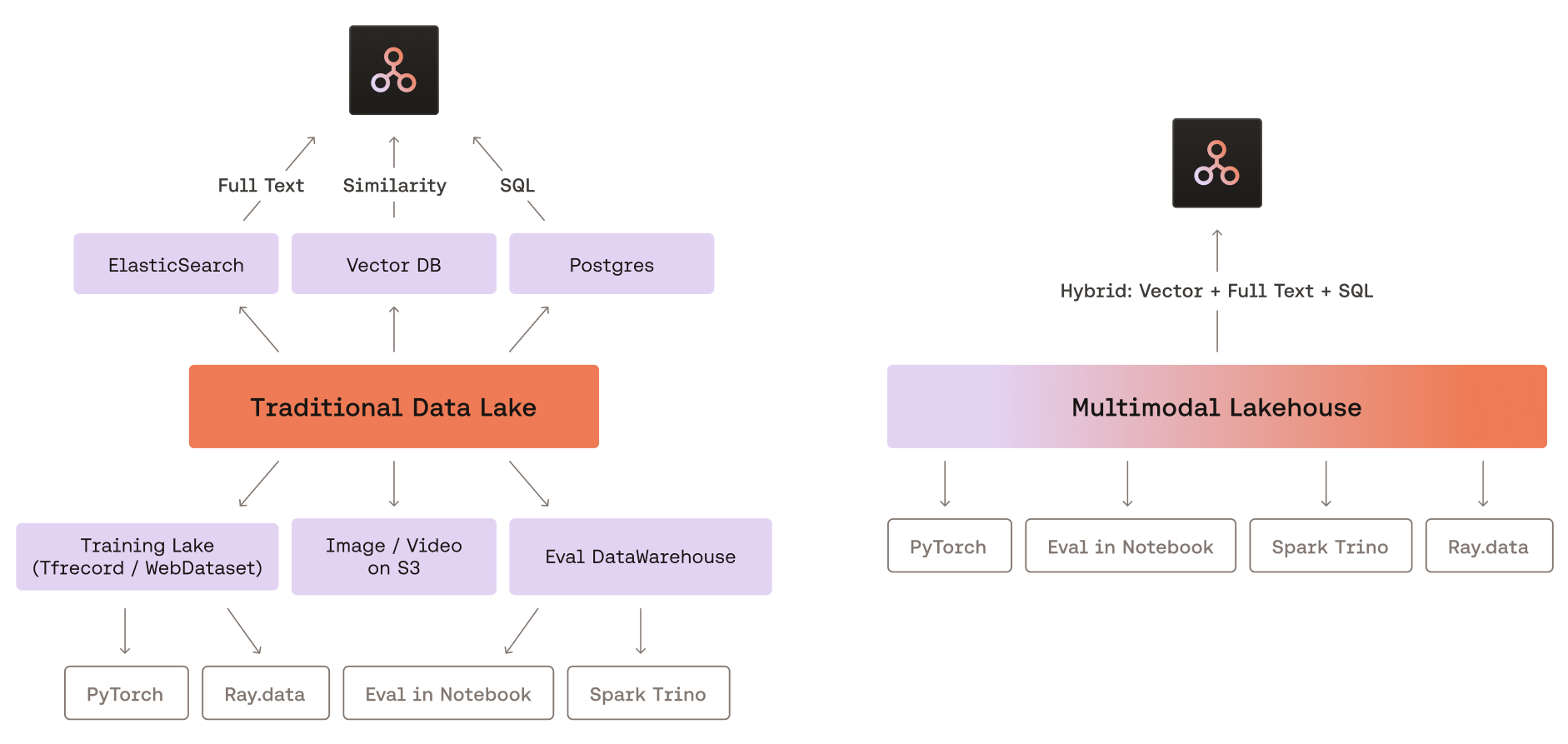
LanceDB has no server process. It embeds directly in Python or Rust, and its storage layer points at a local directory, S3, GCS, or Azure Blob, so deploying it in Lambda functions, Jupyter notebooks, or edge devices is trivial.
Disk based indexing keeps scaling cheap. Indexes live on NVMe/object storage instead of RAM, so you can index datasets far larger than available memory. A machine with 32 GB RAM can comfortably serve an IVF-PQ index over 100M+ vectors.
Zero copy versioning is built in, and it's very useful for ML workflows where datasets evolve. You can roll back a bad data ingestion, audit what data existed at training time, or update datasets while queries keep running against stable versions.
Lance is Arrow native, which gives you zero copy interop with Pandas, Polars, DuckDB, PyTorch, and any Arrow compatible system.
6.2 Weaknesses
The ecosystem is immature. Parquet has a decade of tooling: Spark, Athena, Trino, Hive, dbt, and every BI tool can read it. Lance is mostly limited to Python/Rust clients and tools that explicitly support it.
Compaction is mandatory operational work. As fragments accumulate across many inserts, you have to compact the dataset periodically or accept worse query performance. In the open source version this is manual; in Cloud/Enterprise it is automated.
Index training is expensive. Building an IVF-PQ index over 10M+ vectors requires running K-means, which is slow and memory intensive. Large indexes can take hours to train on CPU.
High frequency small writes hurt. Lance's append only fragment model is efficient for batch inserts, but writing one row at a time creates a new fragment and a new manifest version per row. Without compaction, this degrades performance quickly.
Search recall is approximate, since IVF-PQ is lossy. At default settings, recall@10 might be ~95%. Applications requiring 100% exact recall must use brute force scan (no index) or pair with a refine step.
It's not a general purpose OLTP database. Lance has no transactions, foreign keys, UPDATE with RETURNING, or complex joins; it's built for read heavy ML/analytics patterns.
6.3 Use case analysis
RAG (retrieval-augmented generation): excellent fit
User query → embed → vector search in LanceDB → top k chunks → LLM

Why Lance works: unified storage of raw chunks + embeddings, fast ANN,
hybrid search, no infrastructure to manage. Single directory on S3.
ML training data curation: excellent fit
Large image/video datasets (LAION, COCO, proprietary) stored in Lance benefit from fast random sampling (DataLoader random access), built in versioning for dataset iterations, and storage of labels + raw bytes + embeddings in one place. PyTorch integration is a first class use case for Lance.
Feature store for real time inference: moderate fit
Lance can serve feature vectors for model inference, with low latency row lookups by primary key via the page table. If real time feature updates push write throughput high (thousands of writes/second), though, fragments pile up fast and you have to schedule compaction carefully.
OLAP analytics dashboard: poor fit
For purely analytical queries (GROUP BY, aggregations, complex joins) over tabular data with no ML component, Parquet + DuckDB or a dedicated data warehouse is a better choice. Lance would only add complexity.
Billion scale semantic search: good fit with caveats
LanceDB with IVF-HNSW-PQ can serve billion scale ANN search from NVMe backed cloud storage. Because it's disk based, you aren't paying for a fleet of RAM heavy nodes. At this scale, though, query latency is higher than in memory HNSW (e.g., Qdrant or Milvus), and your use case has to tolerate that.
6.4 When to choose LanceDB vs. alternatives
| Scenario | Recommendation |
|---|---|
| Small RAG prototype, single developer | LanceDB (embedded, zero ops) |
| Production RAG, team of engineers | LanceDB Cloud or Qdrant/Weaviate |
| ML training data pipeline | LanceDB + PyTorch DataLoader |
| High write, real time feature store | Redis or Cassandra + separate vector DB |
| Pure OLAP analytics | DuckDB + Parquet |
| Billion scale search, strict latency SLAs | Milvus, Qdrant (in memory HNSW) |
| Billion scale search, cost optimized | LanceDB on NVMe backed instances |
| Multimodal (image + text + vector) in one store | LanceDB (unique strength) |
7. Conclusion
LanceDB and the Lance format fill a real gap. Parquet was designed around the assumption that sequential analytical scans over tabular data are the dominant access pattern. AI workloads need things Parquet was never designed for: random access into massive embedding stores, unified multimodal data management, and native vector similarity search.
Dropping row groups, page table driven random access, and the structural/compressive encoding split (v2.1) fit Lance to the way ML workflows read data. Disk first indexing makes large scale vector search cheap in a way RAM centric competitors can't easily match.
That said, Lance and LanceDB are still relatively young. Teams already running production Parquet pipelines with existing BI tooling face a real switching cost. If you're building a new ML native data system, especially one handling multimodal data, RAG pipelines, or ML training data at scale, LanceDB is worth a serious look as the foundation.
The Lance file format has a published research paper, active standardization work, and a growing list of integrations, so it looks like more than a niche tool for a niche database. It may end up shaping what columnar formats look like for AI workloads.
Code examples use lancedb>=0.8 and pylance>=0.12. API details may vary across versions.